Your whole agent stack, from the terminal
almyty ships a suite of small CLIs that share one login: authenticate, drive agents, chat, install skills into your editor, proxy MCP, and run agents on your own machine. Install the umbrella binary, or run any package with npx.
# one login, shared by every almyty CLI (~/.almyty/credentials.json)
$ npx @almyty/auth login

# or set it in the environment
$ export ALMYTY_TOKEN=ak_live_…
The suite
One credential store, the whole toolchain
Run the umbrella almyty binary, or pull any single package with npx. They all share the same login.
@almyty/cliOne binary for everything
The umbrella CLI. Installs a single almyty command that delegates to every package below.
# install once, run anything
$ npm install -g @almyty/cli
$ almyty login@almyty/authOne login, shared everywhere
Browser-based login that mints a long-lived key. Every CLI reads it from ~/.almyty/credentials.json.
# opens the browser, stores the key
$ npx @almyty/auth login@almyty/agentsList, run, and inspect agents
Drive your agents from scripts and CI: list them, run one with input, and read past runs.
$ npx @almyty/agents list
$ npx @almyty/agents run research-bot@almyty/chatTalk to an agent, in the terminal
An interactive REPL. Stream an autonomous agent step by step without leaving your shell.
# interactive chat with an agent
$ npx @almyty/chat research-bot@almyty/skillsSkills into your AI editor
Install a gateway’s tools as Agent Skills into Claude Code, Cursor, Windsurf and more — or run one directly.
$ npx @almyty/skills install acme/petstore
$ npx @almyty/skills run acme/petstore/get-pet --id 3@almyty/mcp-serverBridge a gateway to any MCP client
A local MCP server that proxies your gateway’s tools to any MCP-compatible client.
# register with Claude Code
$ claude mcp add petstore -- \
    npx -y @almyty/mcp-server acme/petstore
almyty is an MCP server
Control the platform from your AI assistant
It is not only your gateways that speak MCP — almyty itself does. Point Claude Code (or any MCP client) at the platform endpoint and your assistant can connect APIs, generate tools, build agents, and set up gateways for you, by calling almyty's own tools.
# add almyty's own MCP endpoint
$ claude mcp add almyty \
    --transport http https://api.almyty.com/mcp

# now ask Claude to, e.g., "import this OpenAPI
# schema and publish an MCP gateway for it"
@almyty/runner
Expose any environment to your agents
The runner is a small daemon. Run it anywhere Node runs — your laptop, a cloud VM, a Kubernetes pod, a Docker container, an edge device — and it connects that environment to almyty, which publishes its capabilities as tools. Attach them to a gateway and any agent can call them: one you built, or a Claude Code session over MCP. The environment runs the commands locally; the LLM stays in the backend; your code and credentials never leave it. One runner per account in v1.0; multi-machine support is on the way.
The surface is generic — spawn, shell, read, signal, scoped to a workspace — so an agent can do whatever the machine can: run a build, query data that only lives there, operate a server.
It also natively drives coding agents. The runner launches CLIs like Claude Code, Codex, Cursor, Gemini, and aider as unattended members — headless auth, isolated per-member config, auto-approve, and live busy/idle/awaiting status — so an agent can run a multi-vendor coding team and watch it. You compose the orchestration; it runs on one machine in v1.0.
# register this machine with almyty
$ npx @almyty/runner start --name my-laptop

# it appears online in the dashboard; agents can now
# run commands + CLI tools here, in a scoped workspace
$ npx @almyty/runner status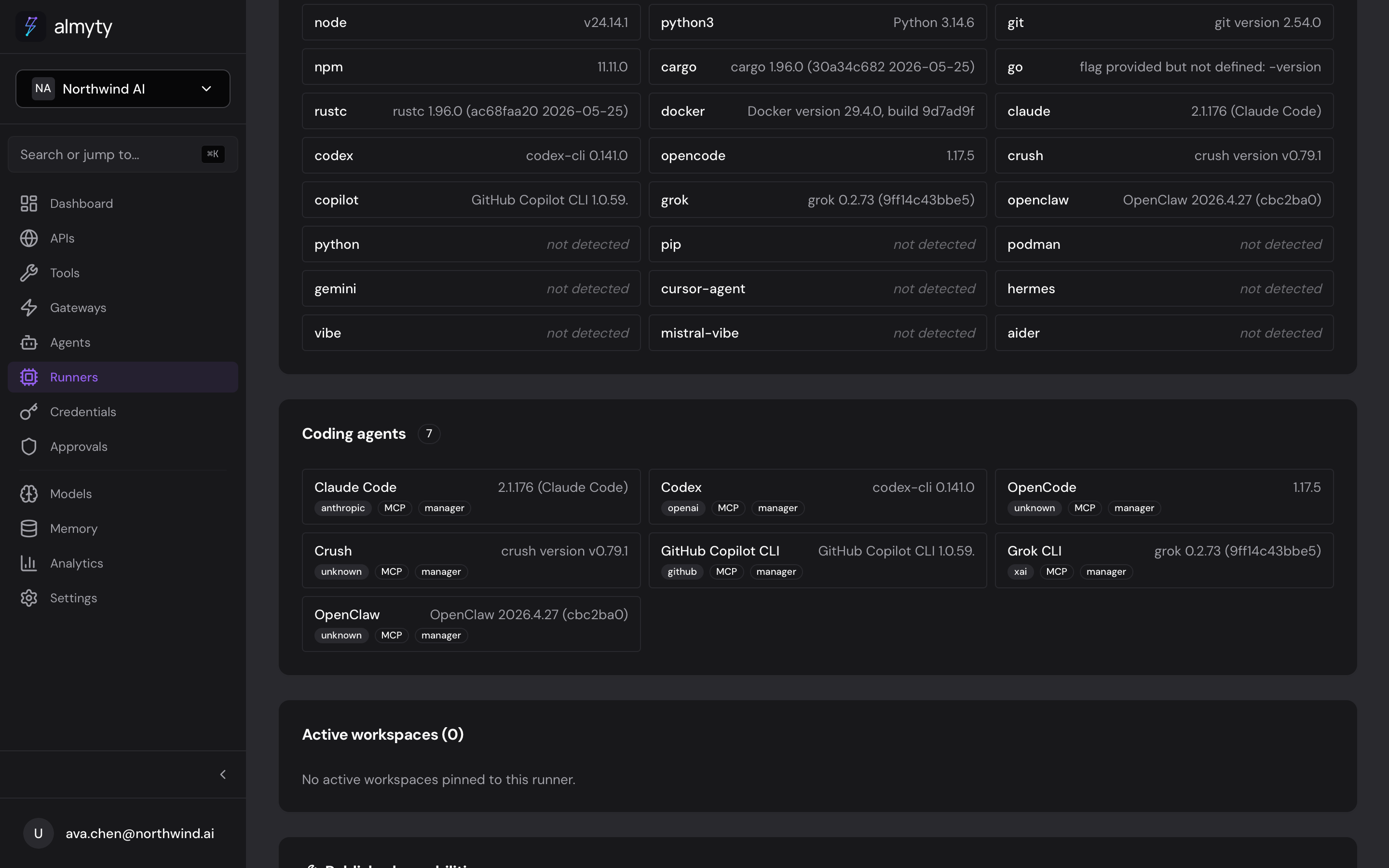
The dashboard shows what a runner can drive — here, the coding agents detected on the machine.
One login, then npx anything
Authenticate once and the whole suite is yours — agents, chat, skills, MCP, and a runner on your own machine.