
What changed upstream, before stand-up
Every weekday at 8:30 it checks a public code project your team builds on, for new releases and for open issues that look like bugs or security problems.
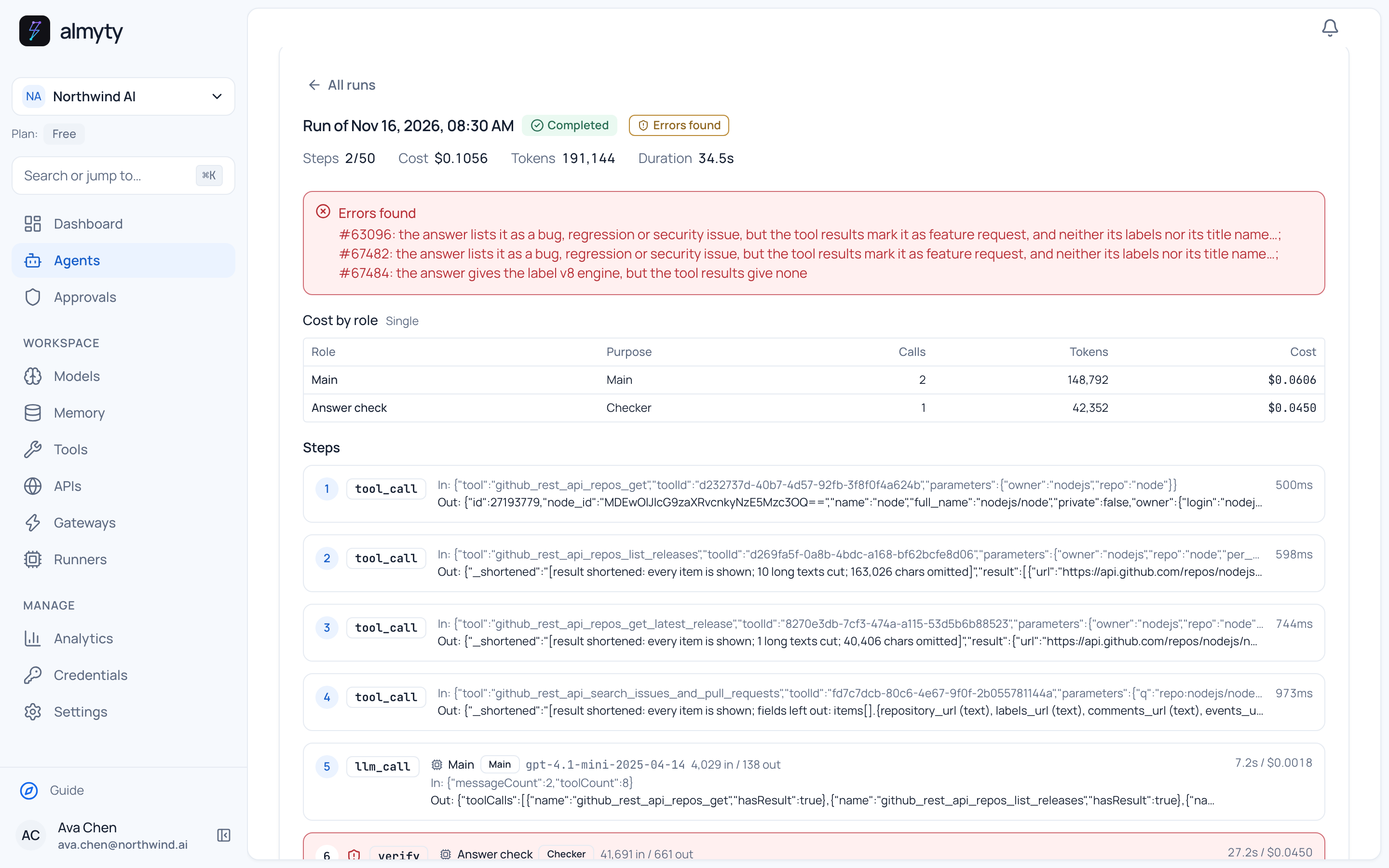
One recorded run
Ten issues worth a look, three lines questioned
Who it is for
Engineering teams who build on open source projects and want to hear about new releases and serious bugs before they run into them.
On 16 November at 8:30 the agent looked at the Node.js project on GitHub for the past day. There was no new release (the latest was from 12 November), and it listed ten open issues worth a look, among them a crash when a worker thread stops while compression is starting up, and a crash when copying files to the top of a Windows drive.
Its answer check, a model from a different provider, questioned three lines: two issues listed as bugs were feature requests, and one label was not on the issue. The report still arrived on time, with those notes at the top.
Recorded once in the staging demo workspace against public APIs. The numbers are copied from that run; another run, other data or another model can give a different result.
What the agent does
- Runs on its own every weekday at 8:30
- Lists new releases in the time window, and the latest release
- Picks the open issues whose labels or titles point to bugs, regressions or security problems
- Has a model from a different provider check the report, and notes what it questions
What you need
- The project's name on GitHub, for example nodejs/node
- Two AI models from different providers: one writes, the other checks
- Nothing else for a public project: GitHub answers without a key, with lower limits
Set up your own
Three steps to a version of this.
The docs walk through an agent of this kind step by step. It is a guide to the pattern, not a copy of this exact agent.
Read the guideConnect GitHub
Paste the link to GitHub's API description and keep the actions for repositories, releases and issue search.
Build the agent
Describe the report, and add an answer check with a model from another provider.
Set the schedule
Every weekday at 8:30, with the project and the time window in the message.
Keep exploring
Other recorded examples.
Operations
A weather brief for every site
Checks the three-day forecast for each of your sites, warns about heavy rain, strong gusts and hard frost, and lists any active US weather alerts.
Finance
What this week's exchange rates did to your invoices
Takes your open invoices in other currencies, gets the European Central Bank rates for today and a week ago, and shows the change in euros, invoice by invoice.
Research
New papers on your topic, every weekday morning
Every weekday at 8:00 it searches a public index of research papers for your topic, skips the ones it already reported, and lists the rest with a line on why each matters.
Start with a job like this one.
Connect the service, describe the result you want and check the first run yourself.